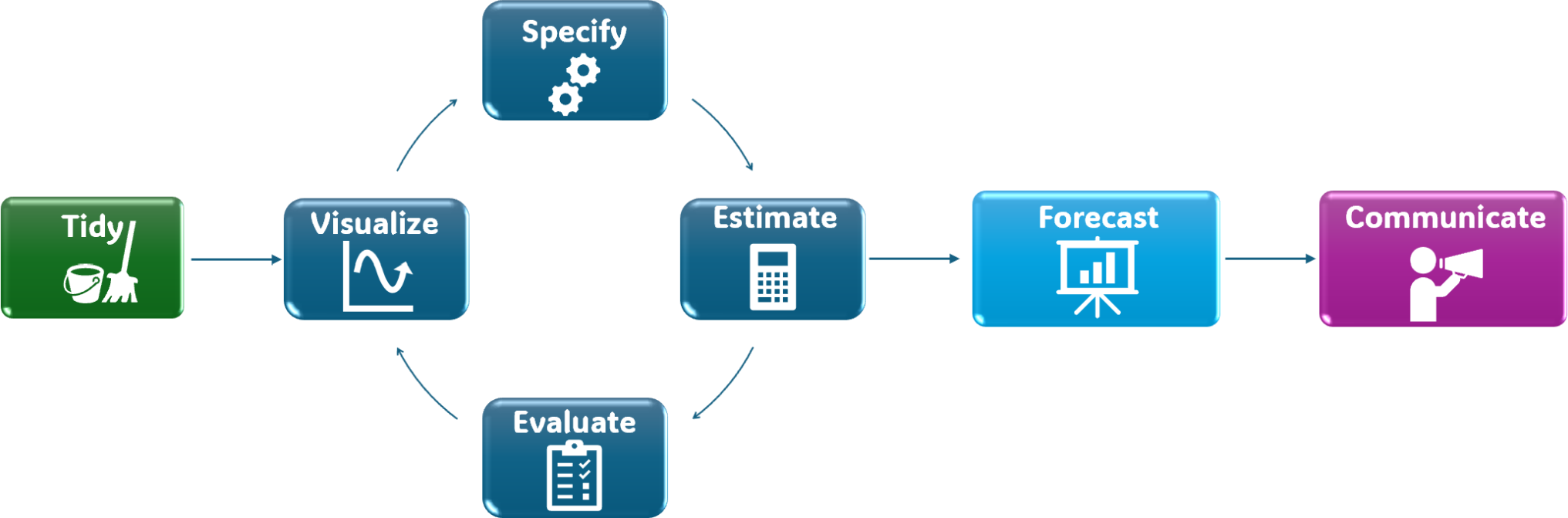
- 1
-
Replace
start_dateandend_datewith the desired date range for the training set.You can also use.to indicate the start or end of the series:filter_index(. ~ "end_date")orfilter_index("start_date" ~ .).
readr::read_csv(), readxl::read_excel(), or tidyquant::tq_get() to import the data into R. You can find more on this here.Data tidying and transforming are covered in detail in R for Data Science.
Transform the resulting tibble into a tsibble:
index (time) variable with the proper time format1.key argument is only necessary if the dataset contains more than one time series.Split the data into a training set and a test set2. The training set is used to estimate the model parameters, while the test set is used to evaluate the model’s performance on unseen data.
The size of the training and test sets depends on the length of the time series and the forecasting horizon:
We can use filter_index() to create the training set3:
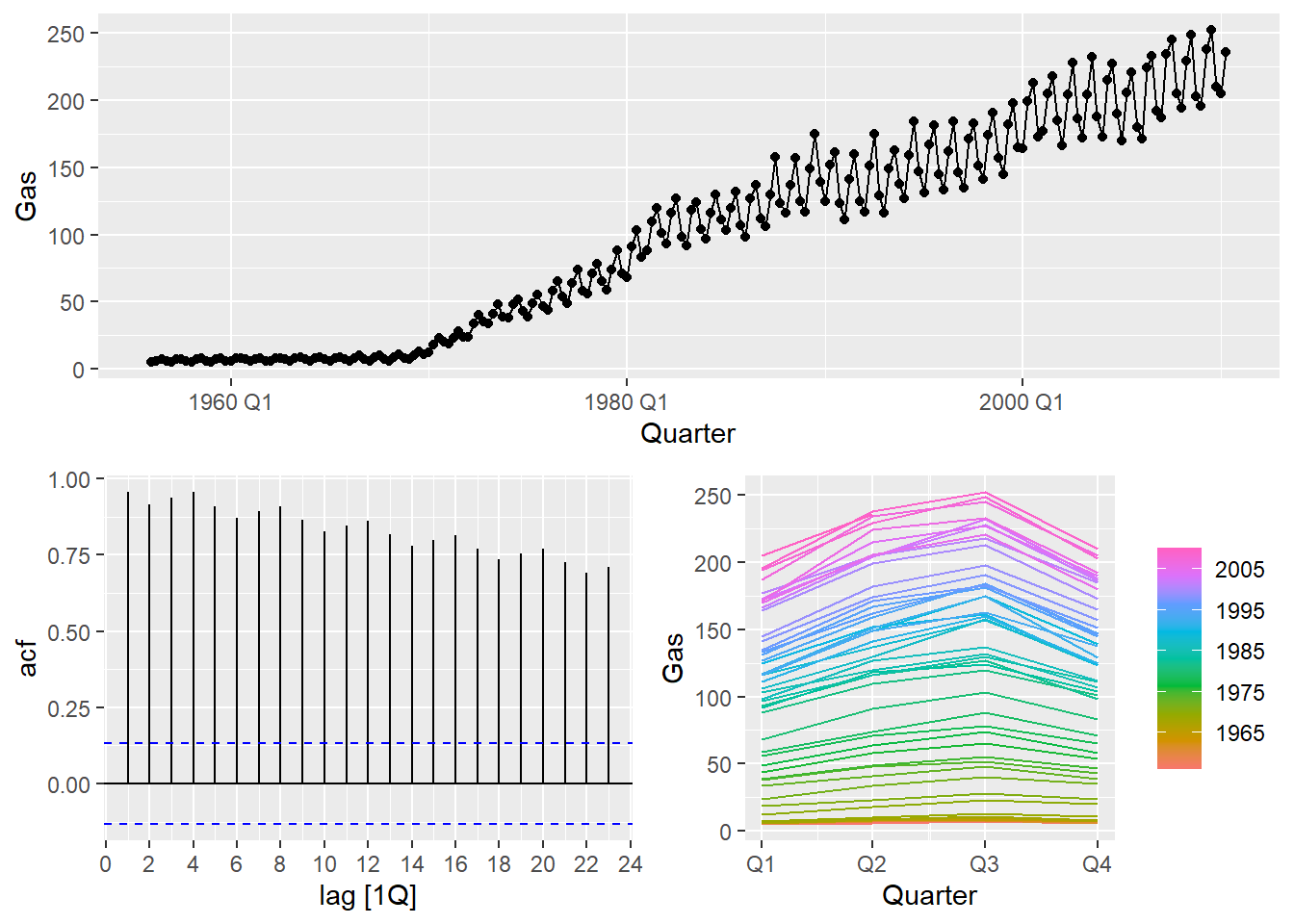
Plot the time series to identify patterns, such as trend and seasonality, and anomalies. This can help us choose an appropriate forecasting method. You can find many types of plots here.
Decide whether any math transformations or adjustments are neccesary and choose a forecasting method based on the series’ features.
Train the model specification on the training set. You can use the model() function to fit various forecasting models4.
model_function_1 with the desired forecasting method (e.g., ARIMA(), ETS(), NAIVE(), etc.). Replace <y_t> with the name of the forecast variable and <predictor_variables> with any predictor variables if applicable.
transformation_function with the appropriate function (e.g., log, box_cox, etc.) and include any specific arguments required by the model.
e_t = y_t - \hat{y}_t .
We can check if a model is capturing the patterns in the data by analyzing the residuals. Ideally, the residuals should resemble white noise.
We expect residuals to behave like white noise, thus having the following properties:
The most important:
Uncorrelated: There is no correlation between the values at different time points.
Zero mean: The average value of the series is constant over time (and equal to zero).
Nice to have:
Constant variance: The variability of the series is constant over time.
Normally distributed: The values follow a normal distribution (this is not always required).
If the residuals don’t meet these properties, we could refine the model:
Once a satisfactory model is obtained, we can proceed to forecast6. Use the forecast() function to generate forecasts for a specified horizon h.:
<forecast_horizon> with the desired number of periods to forecast (e.g., 12 for 12 months ahead), or you can write in text "1 year" for a one-year forecast.
Forecast horizon
The forecast horizon should have the same length as the test set to evaluate the model’s performance accurately.
We measure a forecast’s accuracy by measuring the forecast error. Forecast errors are computed as:
e_{T+h} = y_{T+h} - \hat{y}_{T+h|T}
We can also measure errors as percentage errors7:
p_t = \frac{e_{T+h}}{y_{T+h}} \times 100
or scaled errors8.:
q_{j}=\frac{e_{j}}{\frac{1}{T-1} \sum_{t=2}^{T}\left|y_{t}-y_{t-1}\right|},
For seasonal time series:
q_{j}=\frac{e_{j}}{\frac{1}{T-m} \sum_{t=m+1}^{T}\left|y_{t}-y_{t-m}\right|}.
Using this errors, we can compute various error metrics to summarize the forecast accuracy:
| Scale | Metric | Description | Formula |
|---|---|---|---|
| Scale-dependent |
|
|
|
| Scale-independent |
|
|
|
i.e., if the TS has a monthly frequency, the index variable should be in yearmonth format. Other formats coud be yearweek, yearquarter, year, date.
Splitting the data into a training and test set is the minimum requirement for evaluating a forecasting model. If you want to avoid overfitting and get a more reliable estimate of the model’s performance, you should consider splitting the data into 3 sets: training, validation, and test sets. The validation set is used to tune model hyperparameters and select the best model, while the test set is used for the final evaluation of the selected model. For an even more robust evaluation of forecasting models, consider using time series cross-validation methods.
and store it in a *_train object.
and store the model table in a *_fit object.
We will focus on innovation residuals whenever a transformation is used in the model.
and store the forecasts in a *_fcst object.
Percentage errors are scale-independent, making them useful for comparing forecast accuracy across different series.
Scaled errors are also scale-independent and are useful for comparing forecast accuracy across different series.

Time Series Forecasting